


We Ran NVIDIA Auto Ontology: A Map of Your Database for AI Agents

Before You Install: Trending Repos #44
The video uses a digital avatar of Erick Grau, CEO of Chibitek.
If your team is wiring AI agents into a PSA, an RMM or a client's SQL database, you already know the problem. The agent doesn't know what your tables mean. It guesses how they join, guesses how "revenue" is calculated, and writes a query that looks right and isn't. NVIDIA built a project to fix that, and it's getting a lot of attention. Before anyone points it at client data, here's what we saw.
What Did We Actually Do?
On Monday, Nov. 16, 2026, we installed and ran Auto Ontology in a locked down sandbox. We used the public code at commit 6233789 (version 1.2.0), the latest on main that morning.
Inside the sandbox we:
Installed it from the project's own pinned dependency file.
Started the backend and the ingestion service directly, the way the project's developer docs describe.
Pointed it at a fake MSP database we built: four made-up clients, 40 devices and 200 tickets.
Used a stand-in for the AI model, so no real answers were generated.
Recorded every network connection.
We did not run Docker, the web app, the sign-in screen, Vault or the MCP server. We did not use a real model, a real database or any real accounts. We also ran our reconnaissance process on the code, looking for nefarious prompts, code and more. When I say "in our run," that's what we saw in our sandbox, at that commit, on that date.

What Is Auto Ontology?
In plain words, it builds a map of what your database means. It reads your schema, keys and query history. Then it has a model draft business terms, measures and join paths that people can review and certify. After that, it answers questions in plain English by writing SQL against your databases, and it shows you the SQL it ran.
Think of it like giving a new hire the company's data dictionary on day one, instead of letting them guess what every column means.
Repo facts, dated:
Owner: the NVIDIA organization on GitHub.
Stars: 14,599 and 1,305 forks on the GitHub API at 12:42 PM ET on Nov. 23, 2026.
License: Apache 2.0, per the GitHub API and the repo's license file.
Version we tested: 1.2.0, commit 6233789.
Since then: by Nov. 23, main had moved 41 commits ahead, to commit c96048c and version 1.3.0. I rechecked each fine print item below against main. One item changed, and I say so where it applies.
What Was the Good News?

Credit where it's due:
Open source under Apache 2.0, from NVIDIA.
No telemetry found, and no calls home seen. Our code scan found no telemetry. The web app's container build turns off the framework's telemetry. In our run, every connection stayed on the sandbox's own loopback address.
Every answer comes back with its SQL, so a person can check the work.
The extra queries it runs on its own are limited to read-only SELECTs. The project has a check that only allows a single read-only SELECT for those. In our run, that check rejected a DELETE.
The README is honest. It says to keep ports 3001 and 3002 on a private network. It says the backend trusts the user ID that the web app forwards in a header, and that the ingestion service has no login of its own. The Kubernetes (Helm) install, which the project calls the official install, keeps those services internal.
We found nothing malicious in what we scanned and ran. That's not a guarantee, but it deserves credit.
What Is the Fine Print?
These come from our own run and the project's own code, not our guesses.
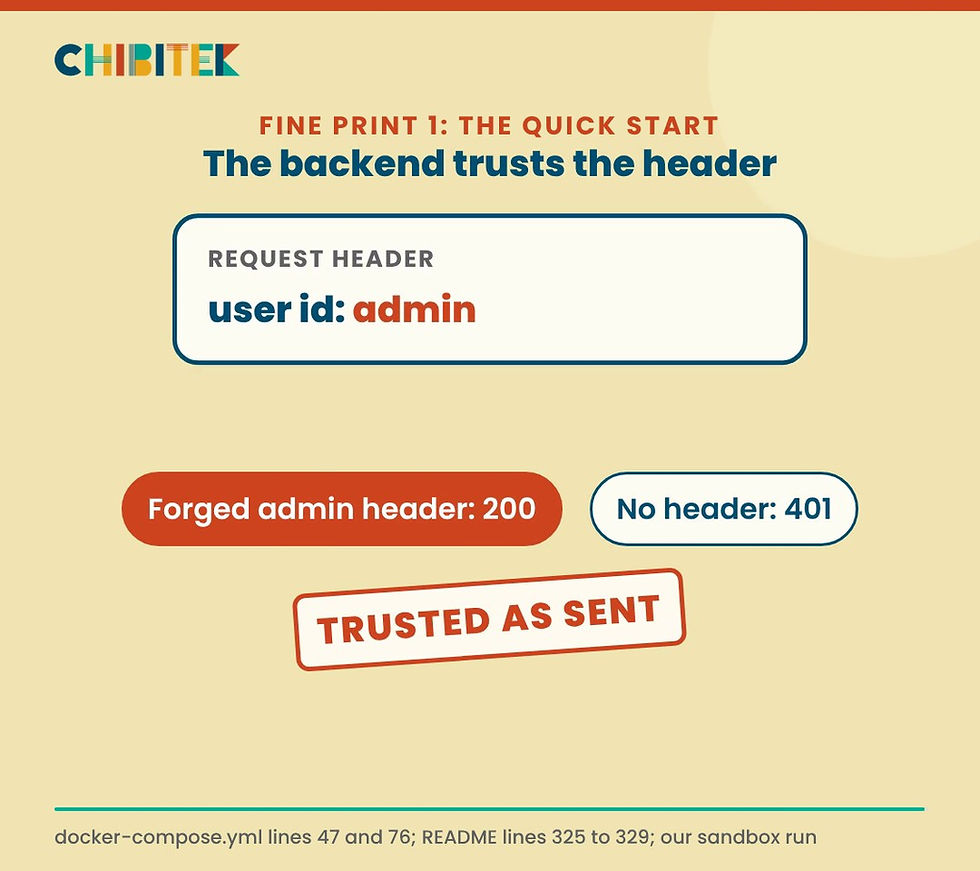
1. The quick start publishes the internal services on every network interface. The Docker Compose file maps ports 3001 and 3002 with no host address. Docker's own documentation says "Publishing container ports is insecure by default," meaning the port is open "not only to the Docker host, but to the outside world as well," unless you bind it to 127.0.0.1. The README says to keep those ports private, but the quick start file doesn't. We had no Docker, so we started the services directly. In our run, both listened on every interface. With no login at all, we listed the catalog, added a database connection and deleted the ingested catalog for our test database. A request with a made-up administrator user ID in the header was accepted. The same request without the header was refused. This file is unchanged on main.
2. The final SQL step had no read-only check of its own at the version we tested. At commit 6233789, the step that runs the final SQL passed the statement straight to the database. We fed it a DELETE on a test Postgres database, and it removed 67 rows. The model wasn't involved. We wrote that SQL ourselves to see what the last step does with it. The same DELETE failed under an account that could only SELECT. Update: later on Nov. 16, NVIDIA added a change (commit 8466bec) that runs that final SQL read-only on Postgres connections. In the current code, Postgres is the only connector that turns that on. So the rule below still stands for everything else, and it's good practice for Postgres too.

3. Without Vault, database passwords are stored in plain text. The project's connection docs say that without Vault, the full connection object, "password included," is stored "unencrypted" in its Postgres database. Vault is off by default. In our run, we saw our test password sitting in that table. The API responses didn't show it, but anyone who can read that database can. This is unchanged on main.
4. Turning on compilation sends sample values to the model. The code puts up to five sample values from each column, each cut to 30 characters, into the prompts that write column descriptions. By default, the model endpoints are NVIDIA's hosted API. Our run didn't reach this step, so this one comes from reading the code. It's unchanged on main.
5. The example settings file ships fixed default passwords. That includes the administrator password and the auth secret. The README tells you to set your own, so do it.
What Should You Do If You Try It?

Connect every database with a read-only account. Never a full-access administrator login. In our run, a SELECT-only account stopped the DELETE cold.
Keep ports 3001 and 3002 off any shared network. Bind them to 127.0.0.1 or drop those port lines from the Compose file, and prefer the Helm install for anything real.
Change every default password and secret before the first start.
Turn on Vault before you add client connections.
Start on a test copy, not live client data, and know which model provider will see your sample values.
These five rules are Chibitek guidance, based on our sandbox run and the project's own code and docs. A tool that can read your schema and run SQL is still software with access to your data, and it belongs on the same list as everything else you manage.
Key Points of NVIDIA Auto Ontology
Auto Ontology is NVIDIA's Apache 2.0 project that gives AI agents a reviewed map of what your database means and how it joins.
Chibitek ran version 1.2.0 (commit 6233789) in a sandbox on Nov. 16, 2026, with a fake MSP database and a stand-in model. Verdict: PASS WITH NITS. Not malicious.
The quick start publishes ports 3001 and 3002 on every interface. The backend trusts the user ID header, and the ingestion service has no login.
At the tested version, the final SQL step ran a DELETE. Current main runs that step read-only on Postgres only.
Without Vault, connection passwords sit in plain text. Compilation sends sample values to the model, by default NVIDIA's hosted API.
Frequently Asked Questions
Did you get real answers out of it? No. We used a stand-in for the model, so no ontology was generated and no question was answered. We tested the install, the services, the APIs and the SQL steps.
Did the AI write a DELETE? No. We fed the DELETE to the final SQL step ourselves. The point is what that step does with a statement, not what the model would write.
Is Auto Ontology open source? Yes, under the Apache 2.0 license.
Does it send my data anywhere? In our run, nothing left the sandbox. By design, it talks to the model endpoints you configure, by default NVIDIA's hosted API, plus your own databases. Schema details go to the embedding model, and compilation sends a few sample values per column.
Is the Docker port issue a bug? Not exactly. It's how Docker publishes ports when no host address is given. It only becomes a problem if those ports are reachable from a shared network.
Let's Review Before You Install
At Chibitek, we look closely at tools like this before they get anywhere near client data, with no geek-speak. If your team wants AI agents answering questions from your PSA, RMM or client databases, contact us at hello@chibitek.com and we can talk through where it should run and what it should be allowed to touch.
Use a read-only account. Keep 3001 and 3002 private.
We make IT effortless so you can create, disrupt, and grow!
Follow Chibitek on YouTube at @chibitekmsp, and follow Chibitek on LinkedIn.
Sources
Every repo claim was checked against the file at the tested commit (623378972e70aacf24e065d06d13df7ac033e613), fetched from GitHub on Nov. 23, 2026, about 12:45 PM ET, then against the current main branch (c96048c, version 1.3.0) and Chibitek's own sandbox run logs from Nov. 16, 2026.
README at the tested commit (what it does, keep 3001 and 3002 private, header trust, model endpoints) and the current README
Docker Compose file at the tested commit (ports 3001 and 3002 with no host address)
Identity check at the tested commit (user ID header)
Final SQL step at the tested commit, the current version and commit 8466bec (read-only on Postgres)
Connection storage docs at the tested commit (plain text without Vault) and connection service
Column description prompts at the tested commit (up to five sample values per column)
Example settings file at the tested commit (default endpoints and passwords)
Helm backend service at the tested commit and ingestion service (internal only), and AGENTS.md (Helm is the official install)
Web app Dockerfile at the tested commit (telemetry turned off)
License file (Apache 2.0)
GitHub repository API (14,599 stars and 1,305 forks on Nov. 23, 2026, 12:42 PM ET)


Comments